
Dazed Games · Steam App 4001890 · Installation and update checks: October 13, 2026
How to Fish Mods: Installation, Menus & Version Checks
How to Fish has community mods on Thunderstore. Match the instructions to the exact package: a mod manager, a settings menu and a cheat menu are different tools. Below is a documented More Colours example, the BepInEx folder layout, and checks for stale “mod menu” or “more players” instructions.
Go to the steps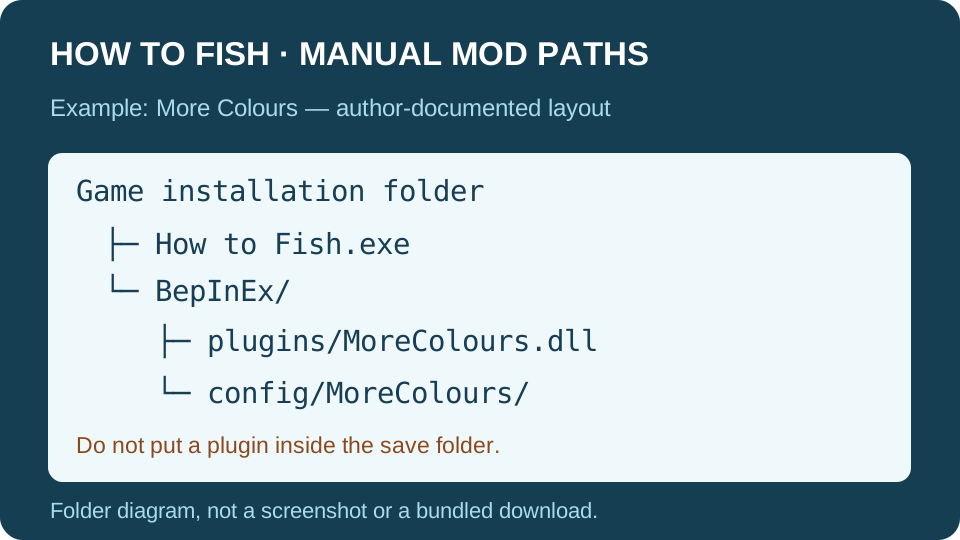
Choose a package by its actual task
| Task / package | What the original source establishes | Decision |
|---|---|---|
| More Colours by Sopika | Version 1.0.6 adds an Options → Colours screen for HUD colours and previews; author describes it as client-side only. | Useful if you want to change HUD appearance. It is not an item-spawning cheat menu. |
| Nexus “How to fish Mod menu”, item 21 | The original listing now says it was removed by its author. | Do not rely on an old search snippet promising an F4 menu or hunt for an unverified mirror. |
| More Players / an 8-player claim | Official Patch 1.0.4 already announced support for up to eight-player lobbies. | Check the built-in multiplayer scope before installing a mod solely for that number. Claims of 16, 32 or 250 players need package-specific evidence. |
Install the documented More Colours example
Read the package’s current dependencies before installing. BepInExPack’s author instructions recommend a compatible mod manager and launching through that manager. That avoids mixing a managed profile with an unrelated manual installation.
For the manual route described by the authors:
- Back up your How to Fish save folder and note the current game build. Close the game before changing its installation.
- Extract BepInExPack into a temporary folder, then move the contents of its BepInExPack folder beside the game executable. Do not leave an extra nested BepInExPack folder in the path.
- Launch once to confirm the loader initializes, then close the game.
- Put
MoreColours.dllinBepInEx/plugins, as the More Colours author specifies. Launch and open Options → Colours.
The author locates settings in BepInEx/config/MoreColours/. That menu offers previews, individual toggles and reset controls. This is an author-documented procedure, not an installation or compatibility test performed by this site.
“The How to Fish folder does not exist”: choose the installation folder
When this message appears in a mod manager, first compare its game-folder setting with the actual Steam installation. The September 6 Steam report ↗ identifies Thunderstore Mod Manager as the tool showing the error. Its replies do not establish a successful fix. The steps below are a directory check based on the related r2modman author’s settings and resolver, not a play-tested repair.
- In Steam Library, open How to Fish’s Properties → Installed Files → Browse. Use the folder Steam opens; do not assume the game is on your C: drive or in the same library as another game. Confirm that it contains the game executable.
- In the manager, select How to Fish and your intended profile. Open Settings → Locations → Change How to Fish folder where that option is present, and select the installation folder from step 1. These labels are documented in r2modman’s source; another manager or version may arrange them differently.
- Do not point this setting at Browse profile folder, the shared data directory, a downloaded ZIP,
BepInEx/pluginsor your save folder. The author’s directory resolver reads the game-folder override separately from profile storage. - Try launching the unmodded game through Steam first, then test the manager launch. If the directory message disappears but a different loader or plugin error appears, record the new message and diagnose that separately. Correcting a path does not prove a plugin is compatible.
See the author’s settings definitions ↗ and Windows directory resolver ↗, checked October 13, 2026. Change Steam folder refers to the Steam client directory, a separate setting. Do not use installation reset or delete your profile to correct a folder selection.
Before a patch or a co-op session
Cannot sell with NoShared Money installed? In a October 12 Steam report ↗, SighGuy says their modded group cannot sell items or earn progression funds after the major update. The thread had no replies when checked October 13. This is one report, not proof that every version of that package is broken. Preserve the host’s save and test a separate clean profile/session before returning to the main run. No verified package version or permanent repair is established here.
Keep the game build, loader version and plugin version in your notes. More Colours’ client-only statement applies to that package: it does not prove that a gameplay, inventory or lobby mod works when only one person installs it.
If a newly added plugin causes trouble, close the game and disable that specific plugin in the manager, or move its own DLL out of the plugins folder for a controlled test. Preserve its configuration and your backup; do not delete the entire game or save directory. A clean profile is more informative than changing several packages at once.
There is no blanket promise here that mods are safe, preserve achievements or work with the installed post-Islet build. Use the original package’s changelog and issue reports for that question. Our Version Mismatch steps address base-game updates, not every mod compatibility conflict.